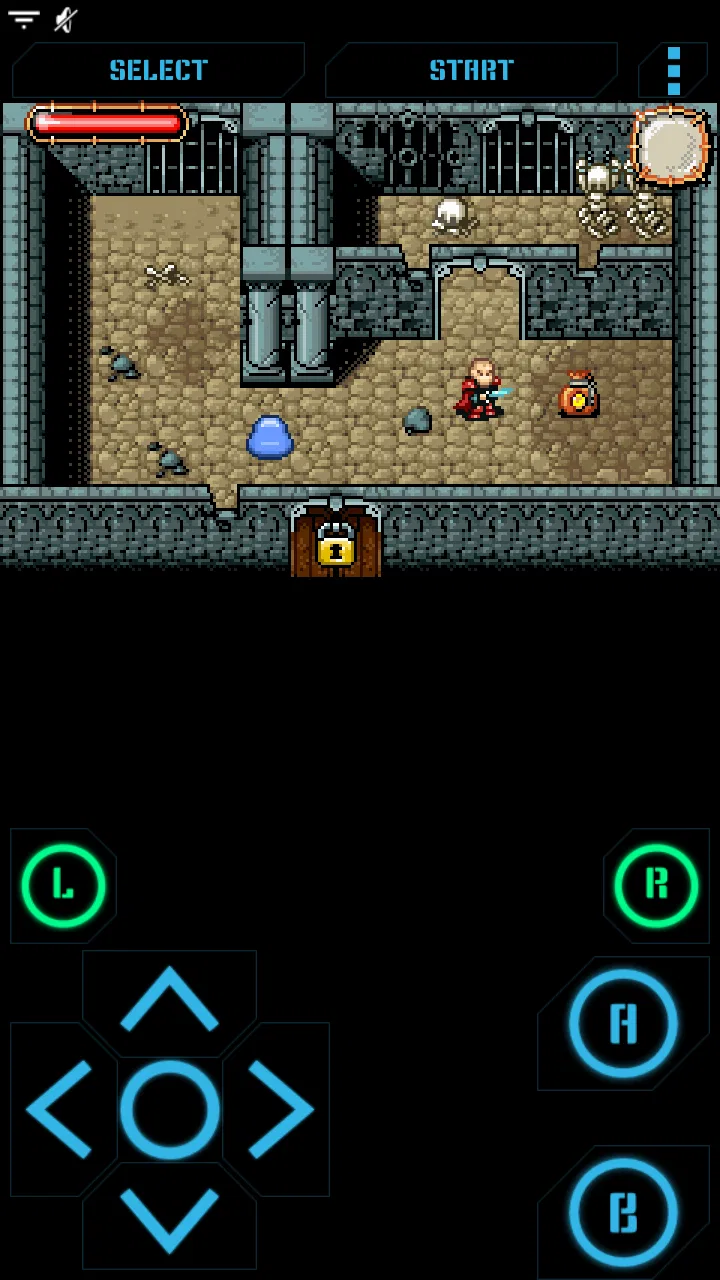
Nostalgia.GBA Pro (GBA Emulato
- 4.2
- Rating
- 10.00K
- Installs
- $2.99
- Price

 Analysis by App-foxy
I approached Nostalgia.GBA Pro as a practical way to play Game Boy Advance titles on a modern Android phone, rather than as a replacement for original hardware. It is an arcade game in the broad store category, developed by Nostalgia Emulators, and its appeal is straightforward: it puts GBA emulation into a paid app with a focused interface instead of asking you to manage a larger, more complicated gaming setup.
That focus matters when you are deciding whether it fits your habits. I found the idea most attractive for short sessions, travel, and revisiting games that work well with buttons and simple menus. It is less convincing for someone who wants a polished contemporary game with built-in content, or for anyone expecting a console-like experience without adjusting controls and display settings.
How the app feels to read, navigate, and use
The first thing I noticed is that an emulator has a different kind of usability from an ordinary arcade game. You are not simply opening a title and tapping “play.” You are moving through a layer that sits between the phone and the game: selecting a compatible game file, choosing how it appears on screen, and deciding whether touch controls are comfortable enough for the session.
You May Also Like

 Pandora - Music & Podcasts
Pandora’s Music Is Easy to Start, but Harder to Recover
Pandora’s strength is its low-effort path from a seed to a station. Its weak spot is how much confidence it asks you to place in connection, setup, and quiet recovery.

 8 Ball Pool
 Is Built on Rivalries, Rematches, and Routine
A close look at the rivalries, rematches, shared routines, and unanswered safety questions that turn a quick pool match into a persistent mobile community.

 Samsung Music
’s Quiet Strength Is Playing What You Already Own
Its reach comes less from spectacle than from dependable access to a personal library. That simplicity is both the app’s strongest retention engine and its ceiling.

 AccuWeather: Weather Radar
AccuWeather Review: A Quick, Clear Forecast for Everyday Decisions
For everyday plans, the best forecast is the one you can understand quickly. AccuWeather makes rain timing, radar, and local conditions easy to act on, with a few trade-offs.

 Hill Climb Racing
Why Hill Climb Racing Still Turns Crashes Into One More Run
A tiny car, a bumpy hill and one more upgrade: Hill Climb Racing keeps resurfacing because its simple chaos makes every near-miss feel personal.

 AliExpress - Shopping App
AliExpress Makes Global Shopping Feel Personal, but Shoppers Bear the Risk
AliExpress turns a global marketplace into a pocket-sized discovery engine. Its reach is useful, its shopping loop compelling, and its trade-offs easy to miss.
More From Our News Desk
View All News


That makes navigation clarity especially important. Nostalgia.GBA Pro benefits from having a narrow purpose. I do not have to work through unrelated genres, social features, or a large content catalog inside the app. Once the basic emulator workflow is understood, the experience can feel direct. The challenge is that the app itself does not provide the game library, so the quality of the first session depends on how prepared the user is with legally obtained GBA software.
For a new emulator user, I would take a few minutes before starting a long game. I would identify the game file in the phone’s storage, open it from the emulator, and then test the on-screen buttons during a low-pressure section. This small preparation avoids a common frustration: reaching an important moment and discovering that the virtual controls are too close together or that the display scale is uncomfortable.
Readability is not only about text size. GBA games were designed for a small handheld screen, and enlarging that image on a phone can make some elements easier to see while also making soft edges more noticeable. I prefer a display arrangement that keeps the original proportions rather than stretching the picture across every available pixel. That choice can leave unused space, but it prevents characters and menus from looking unnaturally wide.
The same trade-off applies to menus. A larger phone screen gives the emulator room to present controls and game imagery together, yet the actual game text remains governed by the original software. If you have difficulty reading small fonts, a phone can help compared with the original handheld, but it cannot rewrite a game’s interface. I would judge each title separately instead of assuming that every GBA game becomes equally accessible on a modern display.
Preparing a comfortable session
I recommend setting up the app while sitting somewhere calm, not during a commute or in the middle of a game. The useful sequence is simple: open the emulator, load the intended title, check the picture, try the directional pad, and press every face button you expect to use. This is more than basic testing. It reveals whether your hands naturally land on the controls and whether the screen remains visible when your fingers are active.
A particularly useful habit is to test a game’s most demanding input before committing to it. A turn-based adventure may be comfortable with touch controls, while a fast platformer can expose every weakness in virtual buttons. If a title requires repeated, precise presses, I would not judge the emulator solely by how pleasant its menus feel. The real test happens when both thumbs are busy and the action accelerates.
On a smaller phone, the controls may occupy a large portion of the visible area. On a larger phone, they may be easier to separate, but reaching across the screen can become less natural if you hold the device with one hand. I would use both hands for games that depend on simultaneous movement and action buttons. One-handed play is better reserved for slower games or menus, where accidental presses are less costly.
Motor and sensory considerations
The biggest accessibility question here is not whether the emulator can launch a game; it is whether the chosen game and control method match the player’s physical needs. Touch controls remove the requirement for a separate controller, which is convenient, but they also provide less tactile feedback than physical buttons. I can feel when a controller button has been pressed. On a glass screen, I have to rely more heavily on sight and finger position.
That difference can matter for players with limited dexterity, tremor, reduced sensation, or difficulty maintaining a fixed grip. A touch layout may be workable for slow menus and turn-based play, yet tiring for rapid action. I would avoid assuming that a paid emulator automatically solves this problem. The app can provide access to a platform, but the experience still depends on the phone, the game, and the player’s preferred input method.
An external controller can change the experience considerably, especially for someone who finds virtual buttons unreliable. It also introduces another device to carry, pair, charge, and position. For me, that is an important trade-off: the emulator is convenient when I want a quick session with only my phone, while a controller is the better choice when accuracy and reduced screen obstruction matter more than portability.
Visual sensitivity is another practical consideration. Bright screens, rapid movement, and strong contrast come mainly from the individual GBA game rather than from the emulator itself. I would lower the phone’s brightness in a dark room and take breaks during longer sessions. If a game contains flashing effects or intense animation, I would treat that as a title-specific concern and stop if the presentation becomes uncomfortable.
Audio can also affect comfort. Playing quietly or with headphones gives more control over the sound environment, but headphones may not be suitable in every situation. A commuter, student, or office worker might need the game muted, while someone using audio cues may prefer a controlled listening setup. The useful point is that an emulator session can be adapted to the surroundings, but the user has to make those adjustments deliberately.
Situational access in everyday use
I can imagine using this app on a train during a short trip. I would choose a game that does not punish interruptions, load it before leaving, and keep the phone in a position that does not force my wrists into an awkward angle. A turn-based title or a game with frequent pauses would suit that situation better than a demanding action game. If the journey becomes crowded, I would stop rather than trying to play while holding the phone insecurely.
At home, the app makes more sense as part of a flexible setup. I might play directly on the phone for a few minutes, then use a controller when I want a longer session. That gives the emulator two different roles: a quick, low-equipment option and a more deliberate handheld-style setup. The convenience is real, but the second option is no longer as simple as opening an app and tapping the screen.
Travel also highlights a question many users have: does buying the emulator mean the games are included? It does not work that way. The app is the emulator, while the games must be supplied by the user through lawful means. I would plan that step before a trip and confirm that the files are stored where I can find them. This prevents the awkward situation of having the emulator installed but nothing ready to play.
Storage organization becomes more important when you keep several titles. I would use clear file names and a dedicated folder, because searching through a crowded download directory is frustrating on a phone. Keeping a small travel selection is often better than carrying every game at once. It makes the library easier to navigate and reduces the chance of opening the wrong file when using the app quickly.
Another everyday use case is introducing a younger family member to older games. The content rating is Everyone, which makes the product broadly suitable from an age-rating perspective, but that does not remove the need for supervision. The original games can still vary in difficulty, reading demands, and control complexity. I would choose the game with the child’s abilities in mind rather than treating the age label as a guarantee that every title will be equally easy to use.
Where the experience still creates barriers
The first barrier is legal and practical game ownership. Someone expecting an all-in-one arcade package may be disappointed because the emulator does not replace the process of finding and managing game files. This is not a minor detail; it shapes the entire first-run experience. If you want instant access to a curated catalog, a licensed retro collection or a conventional mobile game will be a better fit.
The second barrier is touch input. Even when the emulator is functioning correctly, virtual controls can cover part of the game image and can be difficult to operate without looking. Players who depend on tactile landmarks may prefer original hardware or a physical controller. I would consider a controller almost essential for fast games if the phone’s touch layout causes missed inputs, although that adds cost and equipment beyond the app itself.
There is also a learning curve around emulation terminology and phone storage. Users who are comfortable moving files between folders will probably adapt quickly. Someone who rarely handles files on Android may find the process less welcoming than a normal game installation. I would not recommend this as a first gaming app for a person who wants zero setup. Its simplicity comes after the basic workflow has been learned, not before.
Phone ergonomics can become a problem during long sessions. Holding a flat slab with both hands is not the same as holding a dedicated handheld, and the position that works for ten minutes may become tiring after an hour. I would use a stand or change grip regularly at home, while keeping sessions shorter when travelling. The app cannot solve discomfort caused by the shape or weight of the phone.
Performance expectations should also remain realistic. The store describes it as a high-quality GBA emulator, and my view is that its value lies in faithfully supporting the GBA format rather than delivering modern visual enhancements as the main attraction. If your priority is advanced graphics, a large collection of built-in accessibility options, or a deeply customized console interface, another platform may serve you better.
Value, longevity, and who should choose it
The app costs $2.99, so the decision is easier for someone who already owns or plans to play several GBA games. A paid emulator can be worthwhile when you want a focused experience and expect to return to it, but the price does not make the surrounding setup disappear. You still need compatible games, enough patience to configure your preferred arrangement, and a phone that you can comfortably use for gaming.
Its audience is fairly specific. I would recommend it to Android users who miss GBA games, prefer a dedicated emulator rather than an ad-filled free alternative, and are willing to organize their own library. It also suits players who enjoy short retro sessions and do not mind switching between touch controls and a controller depending on the game.
I would skip it if you want a modern arcade game with immediate content, if you dislike managing files, or if touch controls are already a serious obstacle for you. In those cases, a licensed retro compilation with built-in games, original handheld hardware, or a controller-friendly gaming device may be less frustrating. Those alternatives can be more expensive or less portable, but they may offer a smoother path from opening the product to actually playing.
The app has a 4.2 average from around 500 ratings, with more than 100 written reviews and over 10 thousand installs. Those figures suggest a modest but established audience rather than a massive mainstream gaming community. I would treat that as useful context, not as a substitute for matching the emulator to your own phone, hands, eyesight, and game preferences.
It was released on October 29, 2019, and the current version is 2.5.6. It supports Android 5.0 and later, which gives it a broad technical reach across older Android devices. That compatibility is helpful for people using a spare phone as a retro handheld, although older hardware may offer a less comfortable screen, battery, or touch experience than a newer device.
My inclusive verdict
After looking at it through the lens of different abilities and situations, I see Nostalgia.GBA Pro as a focused tool with a clear strength: it can make GBA gaming practical on an Android phone without requiring dedicated hardware from the start. Its best results come when the player chooses suitable games, prepares the library in advance, and treats control setup as part of the experience rather than an afterthought.
The most important trade-off is convenience versus physical feedback. Carrying only a phone is wonderfully simple, but glass controls are not equally comfortable for every player or every genre. A controller can improve precision, while a slower game can reduce the need for rapid input. Those choices make the app more adaptable, but they also mean that accessibility depends on the whole setup rather than on the emulator alone.
I would recommend it to a friend who already knows which GBA games they want to play and is comfortable with a little preparation. I would suggest testing a demanding game early, keeping a small organized library, preserving the original screen proportions, and taking breaks before discomfort builds. With those habits, this $2.99 arcade emulator can be a sensible way to revisit handheld games across travel, home use, and short breaks.
My final view is positive but conditional. Nostalgia Emulators has made a product for people who value access to a specific retro platform, not for users seeking a universal solution to every gaming or accessibility need. If that distinction matches your expectations, the app is focused, affordable, and worth considering. If you need tactile controls, effortless content, or extensive built-in support for different input and sensory requirements, I would choose a different route instead.
FAQs for Nostalgia.GBA Pro (GBA Emulato
01What is Nostalgia.GBA Pro, and what can it do?
Nostalgia.GBA Pro is an Android emulator designed to run Game Boy Advance games on compatible devices. In testing, it focuses on the features players usually expect from a portable-console emulator, including customizable on-screen controls, save and load states, fast-forward support, and controller compatibility. The app itself does not provide commercial games, so users must supply legally obtained game files and understand the copyright rules in their country.
02Does Nostalgia.GBA Pro include Game Boy Advance games?
No. Nostalgia.GBA Pro is an emulator rather than a game store, and it does not normally include copyrighted Game Boy Advance titles. You need to obtain ROM files separately from games you own or from another legal source, then open them through the app. Downloading or sharing ROMs without permission may violate copyright law, even if the emulator itself is legal to use.
03How well does Nostalgia.GBA Pro run games on Android devices?
Performance depends on the Android phone or tablet, the game being played, and the device’s graphics and processor capabilities. On reasonably modern hardware, Game Boy Advance titles should generally run smoothly, while older or entry-level devices may require adjustments to audio, graphics, or frame-rate settings. Before downloading, check Android compatibility and remember that performance can vary between individual games.
04Does Nostalgia.GBA Pro support save states and external controllers?
One of the main advantages of using an emulator such as Nostalgia.GBA Pro is the ability to save progress outside the original game’s normal save system. Save states can usually be created and loaded quickly, which is useful when replaying difficult sections. The app also supports customizable touch controls and may work with compatible Bluetooth or USB controllers, depending on Android permissions and the controller model.
05Is Nostalgia.GBA Pro safe to download and worth installing?
The safest option is to download Nostalgia.GBA Pro from a trusted official app store or the developer’s verified source, rather than from unknown APK websites. Review the requested permissions, check recent user feedback, and keep Android security protections enabled. It can be worthwhile for players who already own legal GBA games and want features such as flexible controls and quick saves, but users should confirm the app’s current price, ads, compatibility, and update status before installing.
Pros
- Supports save states for quick progress recovery.
- Customizable on-screen controls improve playability on phones.
- Fast-forward and frame-skip options shorten repetitive sections.
- Works offline
- making it useful during travel or without mobile data.
- Simple interface makes loading and organizing GBA games straightforward.
Cons
- Game files are not included and must be obtained legally by the user.
- Touch controls can feel imprecise during fast-paced platformers.
- Some games may require configuration changes for proper performance.
- The Pro version may feel costly for users who only play occasionally.
- Compatibility and performance can vary across Android devices.

Nostalgia.GBA Pro (GBA Emulato
Gallery